
Mass Friends Remover for Facebook — Bulk Unfriender
10,000+ Chrome usersReview, select, and remove friends from your own Facebook account in bulk instead of visiting profiles one by one.
 View on the Chrome Web Store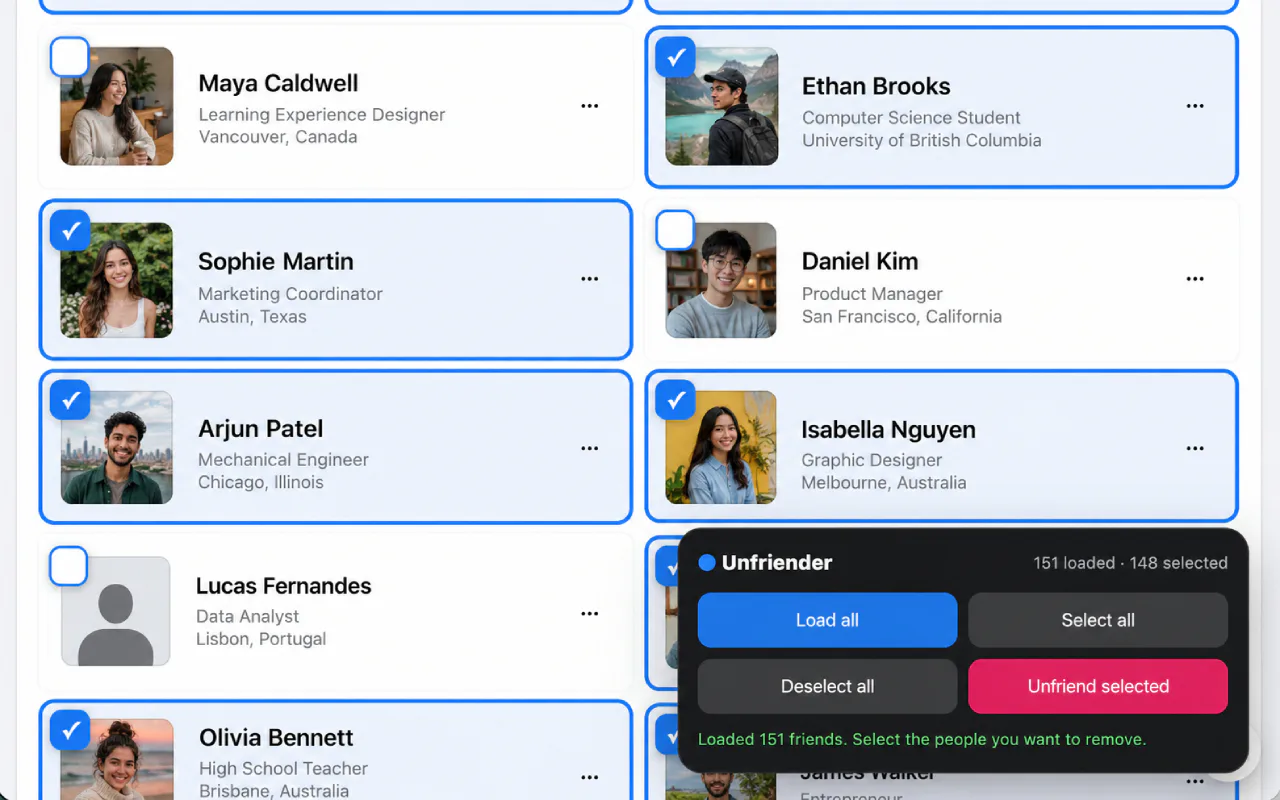
What you can do with your friends list
- Works directly on your Facebook friends page — a checkbox appears on every friend card
- Load all scrolls your whole friends list into view for you
- Tick people individually, or select everyone loaded in one tap
- Fast Speed for the first cleanup actions, useful Standard Speed after that, and Pro-only Super Speed
- A live countdown to the next removal, batch progress, and a stop button
- Pauses on its own when Facebook asks it to slow down, then carries on
- Export your selected friends to CSV with the upgrade
How bulk unfriending works
- Click the toolbar icon. Your Facebook friends page opens with the unfriender switched on.
- Tick the people to remove on the page, or choose Load all and Select all. Nothing is removed until you confirm.
- Choose Unfriend selected and confirm. A delay is kept between removals because Facebook limits fast friend changes, and you can stop at any point.
Limits, and what to expect from Facebook
- Reviewing the selection is your call, and the extension cannot undo a removal once it has run.
- Facebook limits very fast friend changes, so a safe delay sits between removals and a long list takes time.
- Free cleanup starts at Fast Speed and continues at Standard Speed; Pro removes the daily usage limit and unlocks Super Speed.
- Facebook interface changes can temporarily affect the tool.
Facebook bulk unfriend FAQ
Can I use Mass Friends Remover for free?
Yes. Cleanup begins at Fast Speed and continues free at Standard Speed. Pro unlocks unlimited removals and Super Speed.
Does Facebook notify someone when I unfriend them?
Facebook does not send an unfriend notification, although the person may notice later by checking your profile or friends list.
Does CleanMySocial receive my friends list?
No. Friend selection and removal happen in your browser; CleanMySocial does not receive the names of people you remove.
Can I review people before removing them?
Yes. The product is designed around selecting and reviewing the removal list before the run begins.
Plan the cleanup before you start
More from CleanMySocial



Payments are processed by Creem, our Merchant of Record. Taxes may be added at checkout where required. Read our Refund Policy and Terms of Service, or contact support.
CleanMySocial is built and supported by Vladyslav Verbytskyi, the developer you reach when you write in.